Showing posts with label CGI program with IBM. Show all posts

Tuesday, May 2, 2017

AJAX & JSON with CGI Programming in IBM-I

Hello Friends,


In our last article we have seen how to use CGIDEV2 to update an external HTML from RPGLE and using that we were able to see some good looking outputs in browser. Now in this article we are going to see a step further and learn some basics about the following,
  1. What is AJAX
  2. What is JSON
  3. How to use JSON in AJAX in CGI programming

AJAX: Asynchronous JavaScript and XML

In simple term, this is a technique to update the web page content without reloading the page. Also  update includes, sending request to a server in background and based on response received we can update web page content.

E.g.: Let’s take our Order Inquiry example

We call ORDINQ CGI program from web which displays the order inquiry screen and gets input (say 123) and when we click submit, it redirect to ORDLISTCGI program with parameter as 123.


Here, after we click submit the page reloads with ORDLISTCGI program and HTML output is displayed with order details of order# 123.

Now, with AJAX we are going to send HTTP request and receive the response in the background and finally going to display the order list output in the same page without reloading it.

i.e.:


Step 1: Let's create new RPGLE CGI program

I have created a simple CGI program ORDHTML which returns order details in HTML format. It is pretty straight forward. If the order is found, then I am returning the values under <H3> tag.


If we want to test this, check the url http://as400/cgi/ordhtml?order=555 in browser


Now we want this piece of information to be updated in our main page (ORDINQAJAX) when we click submit button.

The good thing is our main page (ORDINQAJAX) is not necessarily being a CGI program. Instead it can be a plain HTML/JavaScript on your desktop.

ORDINQAJAX html:


What we have done here is, when we click Retrieve Order button, it calls loadDoc() function. This is forming the url by concatenating our input number value.

Once the url is formed, a XMLHttpRequest object is created using which we are requesting the response of ORDHTML url.

And finally the output available in responseText is replaced with the paragraph tag with id = “demo”

Input:


Output:


Take a note that the page is not reloaded and result is showed in the same ordinqajax.html

Here we have achieved AJAX and eliminated the dependency of input screen coming from AS400 CGI program. Since, our input screen is our HTML file, we can play with CSS and JavaScript to make it good looking and make is responsive.

But wait… what if we want to change the display format of order details? Currently it is always coming as <H3> header directly from ORDHTML page. Here is JSON comes into play…

JSON: JavaScript Object Notation

JSON is a Java Script object. I am not going in depth about it (because there is lot of tutorial in web). But I will show the basic by giving some examples.

Have a look at the below comparison of a sample XML and converted JSON format. 


JSON string enclosed by curly braces { and } and it is made up of “key” : “value” pair and colon ( “:”) to separate both. If any set is repeated, forms an array which enclosed by square brackets [ and ].

In our example, key “id” has value “901” & phones is an array and each phones contain keys “type” & “number”. Unlike XML, we don’t have any end tag here. So this really helps to reduce the file size.

We are quite familiar with XMLs in AS400/IBM-I but not much with JSON. But this JSON will become handy when dealing with web service or with CGI programming.

Since this is a JavaScript object, we can easily parse this and get the values inside JavaScript program.

E.g.: Once we assign this JSON string into a variable (say variable X) then we can start accessing the values using dot operator.


How to use JSON in AJAX:

The basic idea is we are going to return the json format of output to browser (instead of plain html content). When we receive this result in our HTML we can assign it to a variable in the JavaScript and can split the details and use it inside HTML.

E.g.: program ORDJSON which returns the response as JSON. Please note that I have changed my content-type as text/plain in this RPGLE.
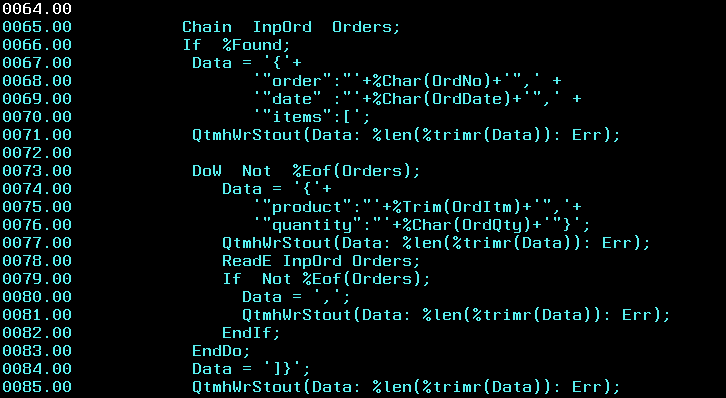

As of now the code looks ugly. I shall come back about this later.

With this program in place,  we are already ready to see the json output in the browser.

http://as400/cgi/ordjson?order=555


Now let’s change our ORDINQAJAX html to parse this json and display output.

Modified ORDINQAJAX.html


We can see, the url is changed to point ordjson CGI program. The result in this.responseText is parsed into JSON using JSON.parse JavaScript method and stores the json object in obj variable.

Then it is just simple programming to use the values inside json. Here in this example, order number and date are just displayed and item details are added into rows of table (which has id=”detail”)

Let us see the input & output.

Input:


Output:


I hope you would have learnt something interesting and useful. Now a day, AS400 business logics (existing RPLGE) is being served as web services. If you have a deeper look, we have just created a RESTful web service based on order number input and it returns order detail as output JSON.

In the world of web programming, you can very well share this URL to your clients and they can use it accordingly to their needs.

What next?

Remember I have highlighted regarding ugly json formatting in RPGLE? You may think what will be the best possible way to create JSON in rpgle. Also if we need some complex JSON to be formed, concatenation is not at all a best way. Also how do we parse a JSON inside RPGLE?

For all these questions, I shall come back with answers in my next article. Until then...

Have Fun…!!! Happy Coding..!!!


Tuesday, April 18, 2017

Dynamic HTML with CGI Programming

Hello Friends,

Last couple of articles, we have been working with some static HTML. Now let’s go a step ahead and create a dynamic HTML with CGI. We are also going to see how to deal with database (PF) as well.

Typically we are going to do below stuffs,
  1. Create a RPGLE program which can get input from browser
  2. Check if we have any data in our database for the input
  3. Respond to browser with the data retrieved from PF
Basic Idea:

I am going to have a database called ORDERS. This will be having order information. We shall get order number from the browser input and will return the order information.


Basically I am going to return the values in the form of HTML Table. So we need to construct table header (<TH>) and table data (<TD>) based on the number of rows.

In summary http://youras400ip/cgi/ordlist/123 should return details of order 123 in table format.

Here ORDLIST is RPGLE , 123 is order number

How to parse URI:

In order to get the order number from the URL we have to parse it. Using IBM procedure GETENV we can retrieve environment variable. Below command will help to retrieve the full URI. 

 Uri = %Str( GetEnv('REQUEST_URI') );   In our case URI = “/cgi/ordlist/123”

Once you get this it is easy to find order number from this. 

 ID1 = '/ordlist/' ;
 Pos = %Scan(ID1: Uri) + %Len(ID1) ;
 InpOrd = %int(%Subst(Uri:Pos));    

Once you get the order number then it is generic programming logic to loop through the order number in ORDERS file and for each record build the Table Detail HTML tag and write it into browser using QtmhWrStout.

Setll  InpOrd  Orders;                                
ReadE  InpOrd  Orders;                                
DoW Not %Eof(Orders);
   Data = '<tr>'                                   +              
            '<td>'+ %Trim(%Char(OrdNo))   +'<td>'  +  
            '<td>'+ %Trim(OrdItm)         +'<td>'  +        
            '<td>'+ %Trim(%Char(OrdQty))  +'<td>'  + 
            '<td>'+ %Trim(%Char(OrdDate)) +'<td>'  +
          '<tr>'                                   ;              
QtmhWrStout(Data: %len(%trimr(Data)): Err);           
ReadE  InpOrd Orders;                                 
EndDo;                                                

How to set library list:

We may have our PF in some other library or we may have different PF sitting in different library. In this case we have to instruct system to load require library list for running the program. This can be done by adding QIBM_CGI_LIBRARY_LIST command in httpd.conf

Multiple libraries can be given by separating with ";"

SetEnv QIBM_CGI_LIBRARY_LIST "LIB1;LIB2;LIB3"


This is it. Just restart your Apache server and point to your browser for accessing the program.

Full version of program is available here .

http://youras400ip/cgi/ordlist/123


http://youras400ip/cgi/ordlist/555


http://youras400ip/cgi/ordlist/1234


So how do you feel..!!! Interesting right... Again it is just simple prototype. We can do even more using CGI. I will try to cover another topic in my next post. Until then...

Have Fun...!!! Happy Coding...!!!

Web Development with CGI programming

Hello Friends,

My previous post AS400 & HTML was about displaying some static HTML page from your AS400 IFS path by changing Apache httpd.conf file (using Alias statement). If you remember, I have stated that IFS directory is the path where we store our HTML. Yes that is true but we can also achieve the same using CGI programming. (In this case there is no need of separate HTML file required).

Note: CGIDEV2 is a separate tool which simplifies the CGI programming but unfortunately it is just free code available over web but IBM no longer supports it. But still it has very large variety of usage and we can use it at our own risk. I shall cover a separate series of blog for this. In this section we are going to concentrate on developing simple CGI program based on IBM provided API.

How the HTML is formed:

Well, obviously we are building the HTML code inside RPGLE only. So that bottom line is, we have to construct the HTML data inside RPGLE and finally we should be able to write it into the browser directory. In other words, we are going to execute the RPGLE program directly from the WEB and the program outputs a HTML data to the browser.

QZHBCGI service program:

QZHBCGI is the service program available under QHTTPSVR library. It contains number of procedures which are used under CGI programming at different state.

QtmhWrStout API:

In this tutorial we are going to look into QtmhWrStout API which is used to write the data into browser.

Ok let’s jump into coding. Assume we are going to write a RPGLE program WELCOME and if we call this program over web it should display “WELCOME to CGI Programming”

i.e.: http://youras400ip/cgi/welcome  should render HTML page.

Step 1: create RPGLE

Yep! This is it. Seems like simple one. But it is the starting point. 

If we split the code, we are storing the raw HTML data inside “Data” variable and directly writing it into browser using QtmhWrStout API.

Do note on two CRLF and Content-type. This is necessary since we are telling browser that we are writing HTML data. But this header will not be displayed in the browser.

How to compile:
  1. Compile the program as module (by giving 15)
  2. Then CRTPGM PGM(*LIBL/WELCOME) MODULE(*LIBL/WELCOME)    BNDSRVPGM((QHTTPSVR/QZHBCGI)) 
Step 2: Apache configuration

Previously we used Alias command and routed any request coming as /mydocs/ to get HTML file from specific IFS folder. Similarly we need to use ScriptAliasMatch configuration for CGI

Add this 4 lines into your httpd.conf file of Apachedft server.


What this essentially means that if any request coming with /cgi/ in the URL then call program from DEVYUS library. ([a-z0-9]+) is actually regular expression.

Note: it is not necessary that you have to give /cgi/ , you can give your own name as well. Just the fact that the URL should be http://youras400ip/cgi/program_name

Okies, once you have done this restart your apache server using 

STRTCPSVR SERVER(*HTTP) RESTART(*HTTP) HTTPSVR(APACHEDFT)

Now point to your browser and type http://youras400ip/cgi/welcome


Wow..!! Congrats you have just completed your first CGI program.

Again it will not seem like big as of now because it is just static page which is build based on string concatenation. So can we do some dynamic HTML based on CGI… well yes we can wait for it to come in my next post. Until then…

Have fun..!!! Happy Coding…!!!