Showing posts with label CGI basics of AS400. Show all posts

Thursday, April 27, 2017

CGI Programming with CGIDEV2

Hello Friends,

As you remember in our last article we have seen how to setup external HTML with CSS and also handling Forms with get and post methods. However the redirected output page was still plain HTML. So in this article we are going to see how we can dynamically change the HTML content from RPGLE and this can be achieved by CGIDEV2 tool.

What is CGIDEV2:

Easy400.net is the home of CGIDEV2, a tool created by IBMer Mel Rotham that allows RPG and COBOL programmers to develop Web apps using familiar techniques. When Giovanni Perotti left IBM in 2005, the website surrounding the CGIDEV2 software soon fell into disrepair. And when Perotti asked IBM to give up its copyright for CGIDEV2, it relented. But thanks to a very impressive letter-writing campaign (Word doc), IBM was convinced to donate CGIDEV2 into the open source realm, where Rotham can continue to enhance it in his retirement. Today, CGIDEV2 is one of a number of free tools available at Easy400.net.

How it works:

You can download CGIDEV2 tool (basically it is a SAVF) and upload & install the same into your IBM i. Clear steps are provided in the website. Once it is done, you can start accessing wide variety of in build procedures offered by CGIDEV2.

There are also handful amount of examples provided in the website for our reference and the source codes are also available in the SAVF.

CGIDEV2 in web development:

CGIDEV2 provides a very simple way of editing HTML from a RPG application.
  • A “template” for the HTML is put in an IFS file.
  • You divide your template into “sections” or “chunks” to be written at one time.
  • You specify fill-in “variables” that will be populated from your RPG code


We can see that different chunk of codes are written into browser by wrtsection(‘sectionname’). Also notice before we write ‘Customer’ section, we are filling the values of variables inside customer section using updHtmlVar procedure.

Now, let’s change our ORDLIST program using CGIDEV2.

I have cloned our ORDLIST program as ORDLISTCGI and created HTML file and placed in IFS path.

Sections in my HTML:


Program to handle this section:

We can follow same steps until we get the order number (using REQUEST_URI or QUERY_STRING) for GET and (using standard input procedure) for POST methods.

Once the order number is parsed we can do our program logic and substitute HTML variables using CGIDEV2 procedure uptHTMLVar. 


WrtSection(‘*fini’) will write all the buffer data into browser. This should be your last statement after writing all the sections of your HTML.

Output of my first CGIDEV2 program:

I have changed my ORDINQ program’s form method to GET  & action as /CGI/ORDLISTCGI

Now if we inquiry the order from ORDINQ, it should go to ORDLISTCGI program

Input Order: 123


Input Order : 555


Input Order: 999


I hope you would got a basic idea how we can make our external HTML to become more dynamic with use of CGIDEV2 tool. I have explained only a basics of what it provides to us. You can very well explore a lot by your own since it is open source and can even customize to our needs.

What next?

So, it is been few weeks we are seeing more towards web development and HTML stuffs. Let us take a break here and I will be explaining how IBM i can be used under Web services (using SOAP & REST protocols) and also how do we use CGIDEV2 in our web services. until then...

Have Fun...!!! Happy Coding...!!!


Friday, April 21, 2017

AS400 CGI with external HTML CSS & Forms

Hello Friends,

In our previous few post, we have been looking into CGI concept from AS400. But all those example were raw HTML inside RPGLE. That really concerns because we really do not want in that fashion since we cannot really compile the program again and again if we want to change the content of our HTML.

So the best way is take it out the HTML content and put it outside the program. If we think outside RPGLE we have two things,
  1. Physical File
  2. An IFS file

Physical file:


The idea is to store the HTML in the physical file. We can use sequence number as key field to retrieve the data in sequence and write it into browser.


The RPGLE code will look like this.


Pros: By this way we do not want to compile the program again and again. We can simply add data into Physical File and see the result in the browser.

Cons: Maintaining the PF is difficult. We need to make sure the data retrieved in the proper sequence. And we cannot really make sure of it.

To resolve this we have the next solution, IFS path.

I assume most of you guys are familiar with IFS path and reading & writing the data into IFS.

IFS path:

We just need to have our HTML inside a IFS folder. Then with a simple RPGLE we can read the whole content and write it to browser.


RPLGE code will look like this.


Output 1 from IFS path:


Change the IFS HTML content:


Output 2:


Pros: Yes, we are having our HTML outside the code, so we can get rid of dependency of compiling the RPGLE. And importantly we can change our HTML as like we want. Just add any HTML code inside the IFS file in a readable format and this will be displayed in your browser.

Cons: I have one but I will be explaining at the end of this article.

Now, let’s jump into something interesting.


Hope you would remember our last post about listing order details in the form of HTML table. But it was done by getting input from browser URL and parsing it inside RPGLE and display the corresponding data. Now, how to get the same done from a HTML Form?

The idea is to create HTML form to get Order number. And when we hit submit we should be able to redirect to our ORDLIST program and catch this inputted order number and show the result(order detail of this order) in HTML browser.

Step 1: Creating HTML form

With our IFS html concept, it is pretty straight forward. You are just going to create HTML with CSS and place the stylish front end in IFS path. (Learn about CSS here) https://www.w3schools.com/css/

E.g.:


Step 2: Redirect to Order List program

We can redirect to other HTML page using action keyword in form tag. But there are two methods, either “get” or “post”.

<form method="get" action="/cgi/ordlist">
(or)
<form method="post" action="/cgi/ordlist">

Let us see how our ordlist program behaves for each method.

1. With "get" Action


Since my input tag field name is "order"

i.e.: <input type="number" name="order" min="0" max="999999999">

We are seeing re-directed URL as /cgi/ordlist?order=123

But it seems our OrdList program is not recognizing this.


Do you remember our correct URL input for ORDLIST program is /cgi/ordlist/123

Because currently it thinks order number will come after “/ordlist/”. So it is not recognizing /cgi/ordlist?order=123

Thus, we need to change the program little to parse this order number from this URL.

2. With "post" action

Using post action, the parameter values will not be passed in the URL. Instead it will be converted as standard input.


This standard input (coming from browser) can be obtained using QtmhRdStin procedure.

Code to read from standard input :

The input will be saved RtnBuffer variable.


Putting it all together:

Now to test both “get” & “post” I am going to write a simple program which receives the input and displays in browser.


This program name is ordinput.  So we need to change our re-direct action such as

<form method="get" action="/cgi/ordinput">

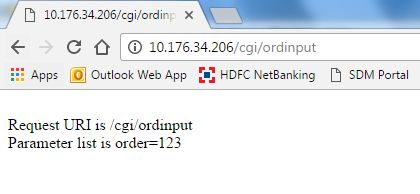
The below outcome is clear, we got the parameters in URL and no standard input is read.


<form method="post" action="/cgi/ordinput">

Here we go..!!! the URL contains nothing. But standard input got value “order=123” due to post action.


One final touch:

I have quickly modified my ordlist program to get the input from Standard input (rather than from URL) and changed my re-direction to /cgi/ordlist with method as "post" and below is my result


What next?


Do you remember I have stated one cons with IFS external HTML. Yes, that is exactly the output we see here. The front end was looking nice with CSS styling but the output is again the plain HTML.

If we want to move this output as external IFS, we have a problem on how do we change the HTML data dynamically from RPGLE? Because the Table may grow or shrink based on input but we need some way to change the IFS HTML itself dynamically.

The good news is, we can do it by CGIDEV2 tool. And my next post will be based on that. Until then…

Have fun…!!! Happy coding…!!!

Tuesday, April 18, 2017

Web Development with CGI programming

Hello Friends,

My previous post AS400 & HTML was about displaying some static HTML page from your AS400 IFS path by changing Apache httpd.conf file (using Alias statement). If you remember, I have stated that IFS directory is the path where we store our HTML. Yes that is true but we can also achieve the same using CGI programming. (In this case there is no need of separate HTML file required).

Note: CGIDEV2 is a separate tool which simplifies the CGI programming but unfortunately it is just free code available over web but IBM no longer supports it. But still it has very large variety of usage and we can use it at our own risk. I shall cover a separate series of blog for this. In this section we are going to concentrate on developing simple CGI program based on IBM provided API.

How the HTML is formed:

Well, obviously we are building the HTML code inside RPGLE only. So that bottom line is, we have to construct the HTML data inside RPGLE and finally we should be able to write it into the browser directory. In other words, we are going to execute the RPGLE program directly from the WEB and the program outputs a HTML data to the browser.

QZHBCGI service program:

QZHBCGI is the service program available under QHTTPSVR library. It contains number of procedures which are used under CGI programming at different state.

QtmhWrStout API:

In this tutorial we are going to look into QtmhWrStout API which is used to write the data into browser.

Ok let’s jump into coding. Assume we are going to write a RPGLE program WELCOME and if we call this program over web it should display “WELCOME to CGI Programming”

i.e.: http://youras400ip/cgi/welcome  should render HTML page.

Step 1: create RPGLE

Yep! This is it. Seems like simple one. But it is the starting point. 

If we split the code, we are storing the raw HTML data inside “Data” variable and directly writing it into browser using QtmhWrStout API.

Do note on two CRLF and Content-type. This is necessary since we are telling browser that we are writing HTML data. But this header will not be displayed in the browser.

How to compile:
  1. Compile the program as module (by giving 15)
  2. Then CRTPGM PGM(*LIBL/WELCOME) MODULE(*LIBL/WELCOME)    BNDSRVPGM((QHTTPSVR/QZHBCGI)) 
Step 2: Apache configuration

Previously we used Alias command and routed any request coming as /mydocs/ to get HTML file from specific IFS folder. Similarly we need to use ScriptAliasMatch configuration for CGI

Add this 4 lines into your httpd.conf file of Apachedft server.


What this essentially means that if any request coming with /cgi/ in the URL then call program from DEVYUS library. ([a-z0-9]+) is actually regular expression.

Note: it is not necessary that you have to give /cgi/ , you can give your own name as well. Just the fact that the URL should be http://youras400ip/cgi/program_name

Okies, once you have done this restart your apache server using 

STRTCPSVR SERVER(*HTTP) RESTART(*HTTP) HTTPSVR(APACHEDFT)

Now point to your browser and type http://youras400ip/cgi/welcome


Wow..!! Congrats you have just completed your first CGI program.

Again it will not seem like big as of now because it is just static page which is build based on string concatenation. So can we do some dynamic HTML based on CGI… well yes we can wait for it to come in my next post. Until then…

Have fun..!!! Happy Coding…!!!