Hello Friends,
In our previous few post, we
have been looking into CGI concept from AS400. But all those example were raw HTML
inside RPGLE. That really concerns because we really do not want in that
fashion since we cannot really compile the program again and again if we want
to change the content of our HTML.
So the best way is take it out the HTML
content and put it outside the program. If we think outside RPGLE we have two
things,
- Physical File
- An IFS file
Physical file:
The idea is to store the
HTML in the physical file. We can use sequence number as key field to retrieve
the data in sequence and write it into browser.

The RPGLE code will look
like this.

Pros: By this way we do not
want to compile the program again and again. We can simply add data into Physical
File and see the result in the browser.
Cons: Maintaining the PF is
difficult. We need to make sure the data retrieved in the proper sequence. And we
cannot really make sure of it.
To resolve this we have the
next solution, IFS path.
I assume most of you guys
are familiar with IFS path and reading & writing the data into IFS.
IFS path:
We just need to have our
HTML inside a IFS folder. Then with a simple RPGLE we can read the whole
content and write it to browser.

RPLGE code will look like
this.

Output 1 from IFS path:

Change the IFS HTML content:
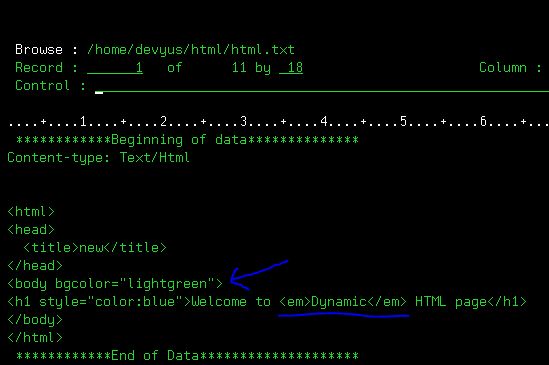
Output 2:

Pros: Yes, we are having our
HTML outside the code, so we can get rid of dependency of compiling the RPGLE. And
importantly we can change our HTML as like we want. Just add any HTML code
inside the IFS file in a readable format and this will be displayed in your browser.
Cons: I have one but I will
be explaining at the end of this article.
Now, let’s jump into something interesting.
Hope you would remember our
last post about listing order details in the form of HTML table. But it was done
by getting input from browser URL and parsing it inside RPGLE and display the
corresponding data. Now, how to get the same done from a HTML Form?
The idea is to create HTML
form to get Order number. And when we hit submit we should be able to redirect
to our ORDLIST program and catch this inputted order number and show the result(order
detail of this order) in HTML browser.
Step 1: Creating HTML form
With our IFS html concept,
it is pretty straight forward. You are just going to create HTML with CSS and
place the stylish front end in IFS path. (Learn about CSS here) https://www.w3schools.com/css/
E.g.:

Step 2: Redirect to Order List
program
We can redirect to other
HTML page using action keyword in form tag. But there are two methods, either “get”
or “post”.
<form
method="get" action="/cgi/ordlist">
(or)
<form method="post"
action="/cgi/ordlist">
Let us see how our ordlist
program behaves for each method.
1. With "get" Action

Since my input tag field name is "order"
i.e.: <input type="number" name="order" min="0" max="999999999">
We are seeing re-directed URL as /cgi/ordlist?order=123
But it seems our OrdList program is not recognizing this.

Do you remember our correct URL input for ORDLIST program
is /cgi/ordlist/123
Because currently it thinks order number will come after “/ordlist/”.
So it is not recognizing /cgi/ordlist?order=123
Thus, we need to change the program little to
parse this order number from this URL.
2. With "post" action
Using post action, the parameter values will not be passed in the URL. Instead it
will be converted as standard input.

This standard input
(coming from browser) can be obtained using QtmhRdStin procedure.
Code to read from
standard input :
The input will be saved RtnBuffer variable.

Putting it all together:
Now to test both “get” &
“post” I am going to write a simple program which receives the input and
displays in browser.

This program name is ordinput. So we need to change our re-direct action such
as
<form
method="get" action="/cgi/ordinput">
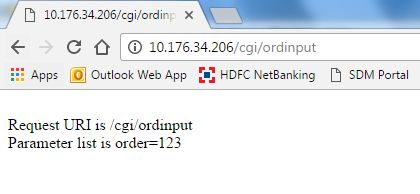
The below outcome is clear, we got the
parameters in URL and no standard input is read.

<form method="post"
action="/cgi/ordinput">
Here we go..!!! the URL
contains nothing. But standard input got value “order=123” due to post action.
One final touch:
I have quickly modified my ordlist program to get the input from
Standard input (rather than from URL) and changed my re-direction to
/cgi/ordlist with method as "post" and below is my result


What next?
Do you remember I have
stated one cons with IFS external HTML. Yes, that is exactly the output we see
here. The front end was looking nice with CSS styling but the output is again
the plain HTML.
If we want to move this
output as external IFS, we have a problem on how do we change the HTML data dynamically from RPGLE? Because the Table may grow or shrink based on input but we need some way to
change the IFS HTML itself dynamically.
The good news is, we can do
it by CGIDEV2 tool. And my next post will be based on that. Until then…
Have fun…!!! Happy coding…!!!


